
Home > Tips > Creating HTML Signatures on Outlook 2007

Creating HTML Signatures on Outlook 2007

Outlook 2003 had a nice feature that allowed you to create a signature from an HTML file. This went missing in Outlook 2007 and a google search for Outlook 2007 signatures brings up a number of posts with people asking for help on how to do this.

ScottH posted a tip that showed you how to do it but it involved editing an obscure html file, the location of which varied from XP to Vista.

The solution is quite simple really and left me scratching my head as to why I didn't think of it before. All you need to do this is the humble copy and paste.

Using a browser open up the html file that you want to embed as your signature, highlight everything and copy/paste it to the signature window in Outlook 2007.

Here is a step-by-step on how to do this.

1. Create your signature using Google Pages. Browse to http://pages.google.com (create an account and log-in if you don't have one)

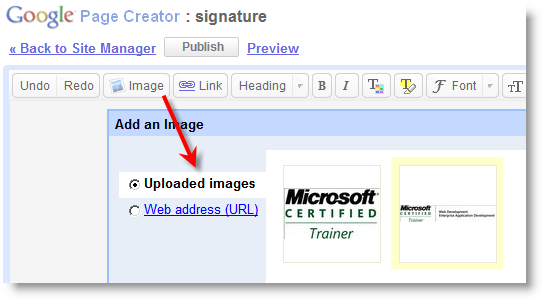
2. Click on the Image button and upload the image that you want to include in your signature. Format the rest of your signature and Publish it.


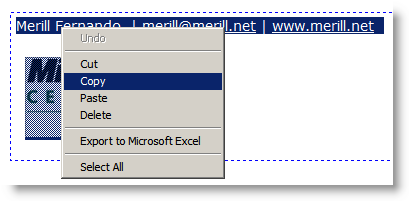
3. In the resulting page, highlight any part of the page that you want to include in your signature and Copy it.
 

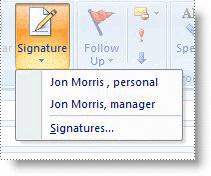
4. Switch to Outlook 2007. In a new message, on the Message tab, in the Include group, click Signature, and then click Signatures.


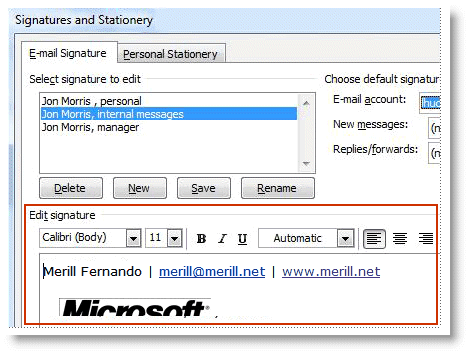
6. On the E-mail Signature tab, click New. Type a name for the signature, and then click OK.

7. In the Edit signature box, paste in the signature that you copied from Google Pages.  
Categories: Tips Tags:
  1. rogo
    March 13th, 2008 at 20:37 | #1

    Man, that hurt…………… how didn’t I think of it before. Thanks

  2. March 15th, 2008 at 04:31 | #2

    Yes but…this pnly works if the link you are putting in your sig is a static one – Im trying to put a link in that changes each time,,isnt working.

  3. dave
    March 17th, 2008 at 12:42 | #3

    doesn’t work if you use a table to space your name, title, logo and contact info.. any solutions?

  4. March 23rd, 2008 at 06:58 | #4

    My current signature does have a table. The way I got this to work is by doing up the table in a word document and then copy/paste it into the signature.

  5. April 3rd, 2008 at 04:14 | #5

    What about for moving HTML text, such as a marquee. I still haven’t been able to get this to work. Any ideas?

  6. Michael
    May 8th, 2008 at 00:32 | #6

    Humungous gratitute, I was racking my brain & even downloaded two free programs trying to get a signature with a marquee & image to work.

  7. Safwan
    July 4th, 2008 at 09:46 | #7

    If you save your html file to an mht using your browser, then you can copy and paste from it and this way you avoid the google step :)

  8. July 14th, 2008 at 04:51 | #8

    Html Attribute for <MARQUEE …> — Marquee Slide Image and Text —
    http://html-lesson.blogspot.com/2008/06/marquee-slide-image-text.html

  9. Ryan
    July 24th, 2008 at 02:33 | #9

    I am able to get an image to appear in my sig file, but… i have a special requirement. The image I am actually call is a .asp page that dynamically generates the image and shows the number of days. hours and minutes before an event. To see what I mean, go to http://www.customerthankyoucards.com/countdown.asp. This asp spits out the current time until the next event. if this file is called as an email, each time it will update the image. but OL2007 wants to embed it into the email rather than linking to the .asp page and calling it again each time. Is there some way to force it to link rather than embed?

  10. August 24th, 2008 at 01:13 | #10

    site page is gone, replaced by google sites,

    Can someone tell me how to do a mybloglog signature in that one, Outlook 2007

  11. Carlos Gabriel
    September 7th, 2008 at 00:53 | #11

    It’s simple why ScottH did’t use the simple Ctrl+C, Ctrl+V. It’s a different solution. When you use a HTML file as signature you can host images in a internet server and your e-mails’s size decrease. If you puts images inside e-mail, size increase. Beside, with HTML signature you can implements any HTML event that you desire. Diferent solutions for diferent problems…
    Cheers

  12. October 1st, 2008 at 11:52 | #12

    I cannot get it to paste the image only the text…

  13. andi
    January 29th, 2009 at 20:34 | #13

    this is all well and good if your doing one signature that’s static, and doesnt include any detailed formatting, i need to do this for a number of employees, and as MS has screwed us by removing the ability to just drop a .doc file in the signature folder of each users machine, im now going to have to go through this fart on, whilst physically sat at each persons machine… what a JOKE!!!

    Im continually astounded at how stupid Microsoft are, not only have they removed this “file drop” functionallity they also removed the “advanced edit” button on the signature editor, which used to fire up “word”…. maybe because people would realise that outlook is in fact….. Word, they are the same program with a different skin.. what a whole load of b&*%$cks

    The day MS fall, we can all finally get on with our work.

    rant over :P

  14. Saint
    February 3rd, 2009 at 18:38 | #14

    Shit Man !!!
    How dumb of me to not think of that..:)

    Thanx to You

  15. Alas
    April 2nd, 2009 at 07:10 | #15

    Ur an idiot the purpose is to have a dynamic signature which pulls an image from a server so you can change it in one place and have it replace all the signatures in one shot

  16. April 23rd, 2009 at 00:36 | #16

    I still can’t get this to work, I get the text but not the background image. If I separate the two it works fine, but it won’t keep the image if the text is overlaid.

  17. apwalsh
    April 28th, 2009 at 02:02 | #17

    This is good info. However, I would like to see if anyone knows if we can use Outlook to point at a html file on a server. This is the setup:

    There are images that will be changed from time to time in every user’s signature that will reside on the server.

    I would like to have an html file on the same server for each user, and just tell Outlook to look at that file to pull the entire signature.

    This way, I would only have to change the html files in one place. If a user changes his/her name or number, I can make the change for them on the webserver, and it the changes will reflect immediately in Outlook the next time they send a message. I have 300 users, so I realize I will have 300 files, but it’s much easier that having it all spread out.

    Thanks

  18. merill
    April 28th, 2009 at 07:56 | #18

    @apwalsh this recommendation was for setting up a personal signature. For your scenario I would recommend using a batch file to create the signature when users login to the domain. The batch file can pull the image from a central location and update it on the user’s profile.
    This is how our corporate signatures are created at my workplace.

  19. TJ
    April 30th, 2009 at 02:19 | #19

    Actually, after fighting through all these workarounds, there’s an even easier one available. Just save the .html file as a .htm file (with the associated files) directly into the Outlook 2007 signatures directory. For some reason, you won’t see the images in the Options dialog box, but when composing emails, everything looks perfect!

    http://support.microsoft.com/kb/923576

  20. Sponge
    May 7th, 2009 at 19:32 | #20

    Tried almost all solutions on the web.. but none work the way i want to.

    This is how i tried to do it:
    1) make new signature in outlook 2007.
    2) find the file that outlook creates.
    3) pasted my own html code in the correct place (somewere near the bottom after all the crap code outlook puts in).
    4) opened outlook and made a new email.
    5) attached the signature.
    6) picture goes all wacky (gets really small, while it originally is 600px wide).

    I don’t have a clue why this happens.. All sizes and entire style is defined to the pixel in the html code, but oulook seems to FAIL at showing it they way it’s supposed to look.

    Any thoughts?

  21. Carolyn
    May 12th, 2009 at 19:15 | #21

    Hi,

    I’m having what may be a very basic problem. I only want to put the text of my signature beside my company logo. With Outlook 2003 I simply created this using a text box in Word, but now I do this, copy and paste from the browser and it reverts to pasting the text below the image. Is there any way to resolve this?
    Thanks.

  22. May 15th, 2009 at 14:14 | #22

    Wow easy! If you have a website, upload the html file you want as you signature file, select the area, copy and paste in to your signature edit area. done :-)

    another way, if on vista this is the path: C:\Users\Home\AppData\Roaming\Microsoft\Signatures

    not sure about XP but there is one. not hard to find I’m sure…

    anyway… just edit the .htm file. Copy and paste your html code over that.

    Can’t believe Microsoft for not making it simple!!

  23. byjil
    May 19th, 2009 at 20:21 | #23

    Daniel Murray..
    i think that only works if your email will be read on explorer but not on outlook…

    can u try another simple thing??
    what my problem also is..
    i want that under my name there is a moving text

    eg.

    Just Kidding

    like that??

    thanks a lot..

  24. June 6th, 2009 at 05:27 | #24

    I have not found a great solution yet, but I can tell you that since Outlook 2007 is XML based and the older versions are not, for some reason without the XML, Outlook will not embed the image. But if you copy and paste the signature like mentioned above, then look at the signature HTML file on the computer, you’ll see there is a ton of XML. At that point, the image address is actually readable. If you have a central system managing your email signatures like we do, you’d have to create one signature file for Outlook 2007 and then another for all the rest.

    Hopefully that helps someone.

  25. U.C.
    July 9th, 2009 at 22:31 | #25

    Guys,

    there is an easier way:

    Create your HTML file (if you have images they should be on web server of course)

    then copy your file under C:\Documents & settings\user name\Application Data\Microsoft\Signatures

    user name = your windows user name.

    then when you go to the outlook signatures page, you will see your html there.

  26. October 9th, 2009 at 05:31 | #26

    The problem I have is that I need my html code to have image mapping capability and with Outlook 2007 I haven’t been able to figure out how to implement that. I use image mapping to make certain areas of the the email signature “clickable” and others just picture.

    Any help on this would be greatly appreciated…thanks!

  27. Stu
    October 10th, 2009 at 01:29 | #27

    Hi,

    Just ran across this. Everyone had the right idea (Vista and Outlook 2007). Only think I had to change to get this to work was to change the file extension of my existing signature from .html to .htm … and magically it appeared.

    Thanks all

    Stu

  28. bullchicken
    January 28th, 2010 at 11:05 | #28

    Just load the signature html in internet explorer, then copy it and paste it into the signature editing window.

  29. justasking
    March 17th, 2010 at 14:16 | #29

    Fine, but my problem is I can’t even get a signature created! Have spent hours on the phone with Microsoft and still no signature. When I create a signature upon naming the new signature the following message appears: “a file error has occurred. (C:\Users\…\newname.htm)
    Any suggestions?

  30. May 17th, 2010 at 16:42 | #30

    Thanks for the great “how-to.” Off subject… can you tell me what app you're using to generate your awesome 3-d rotating tag cloud? Very cool. Thanks. Kate

  31. May 17th, 2010 at 21:15 | #31

    Kate the tag cloud is the work of Roy and is a wordpress plugin.

    http://www.roytanck.com/2008/03/06/wordpress-pl…

  32. lynell
    May 25th, 2010 at 20:20 | #32

    Hey I like your article it was great. Ive been looking for new software and found Planplus Online it’s a new software that helps you take charge of your life ,business ,, and you evr day planner… tatinyurl.com/planplusv7
    or
    http://www.franklincoveysoftware.com

  33. June 3rd, 2010 at 01:36 | #33

    I totally agree the standpoint of upstairs, and I believe this will be a trend. I often come this forum , rom here I learn much and know the newest tide! the content here constantly update shoe and I love it! Another I know some websites which often update their contents, you guys should browse if you are free. http://inin-from.com

  34. Skinny Pixel
    June 29th, 2010 at 21:19 | #34

    I have been using the copy paste method by creating an image map on my graphic email signature then uploading it to my website, going to the page copy all, go to 2007 paste in the signature field.
    However…. I am using Outlook 2010 and it seems to not be working the same way anymore.
    So far no luck doing it the standard way. The work around is to create an HTML (careful of your markup – needs to be email friendly) then save the file to the same location the Outlook stationary is.
    Then just assign a default stationary that is the one you created.
    You can make cool layouts this way…if you know what you are doing.

  35. DarcyKitchin
    July 14th, 2010 at 11:42 | #35

    That's quite a nice way to create a signature. How can I make sure no one else will use the same font combination or same images I use?
    Domain names

  36. Thecritic
    July 22nd, 2010 at 11:20 | #36

    it worked for me just cant see the images when pasting into
    sig editor weird !!

  37. questions
    October 25th, 2010 at 10:01 | #37

    hi there,

    I have created a html signature for a client, they are having trouble inserting this into their email, I have advised to copy from internet explorer and pasting (as mentioned above). they do have a header and footer which causes a few problems. The signature is designed to start at the top it has got a blue band with text it and when pasting the signature it creates a white space at the top almost like it is having a margin at the top for where the inserted image / text should start…? Is there is a way to change this so that the signature can start at the top?

  38. Mike
    November 9th, 2010 at 20:45 | #38

    This is all find and well, but it does not get past the issue of Outlook using Word to render the HTML which changes the code. It nullifies the display:block class which causes gaps between images.

    Also you don't need to go through all of these steps. You just save the html file in the Signature folder for Outlook.

    But it's all a moot point. When you bring the signature into Outlook it is no longer the html, but more the Word rendering of the html, which is far from being the same.

  39. Danno
    November 29th, 2010 at 17:33 | #39

    But Google Pages dosen’t exist anymore… Can this be accomplised in Word?

  40. Bnh
    March 7th, 2011 at 07:27 | #40

    Doesn’t work i you respond to emails

  41. Jaysonnel
    March 10th, 2011 at 10:09 | #41

    And what happens if there are links on the image?

  42. Hd_88b
    March 10th, 2011 at 13:56 | #42

    does not work for complex tags like marquee

  43. jtazz
    August 17th, 2011 at 05:56 | #43

    Create it on Google Sites isntead of Pages. If you’ve written the hyperlinks into the html then it will copy over to the signature in Outlook.

  44. Sam
    September 8th, 2011 at 02:41 | #44

    How about editing in ms word?

  45. subtle
    October 27th, 2011 at 17:53 | #45

    The simplest way to do that, I think, is:
    1. Create your signature in i.e. Word or any other application and save it as html.
    2. Copy the created files to:

    C:\Documents & settings\user name\Application Data\Microsoft\Signatures

    3. Open Outlook -> click “New” to check if the signature is there.

  46. November 26th, 2011 at 12:00 | #46

    Great! Sometimes the simplest things work on what seem to be big issues! I just copied and pasted and I’m done. To change, all I need to do is edit the html file. Even the links in the html file worked.
    Thanks a million
    All the Best
    Tony
    PS Are you the Dilmah Tea guy? I am also from SL!

  1. May 12th, 2009 at 19:02 | #1
  2. August 11th, 2011 at 11:30 | #2