
Show Folder Tree in Windows 7 Explorer
I spend a lot of my time switching between folders in Windows explorer and the Windows 7 explorer has been driving me nuts lately.
Win7 (or at least the build I have) by default does not auto expand the tree view when you navigate between folders.
The result being you don’t see the usually tree hierarchy on the left pane. Which makes it quite painful if you want to go up a few levels or see the other parent folders.
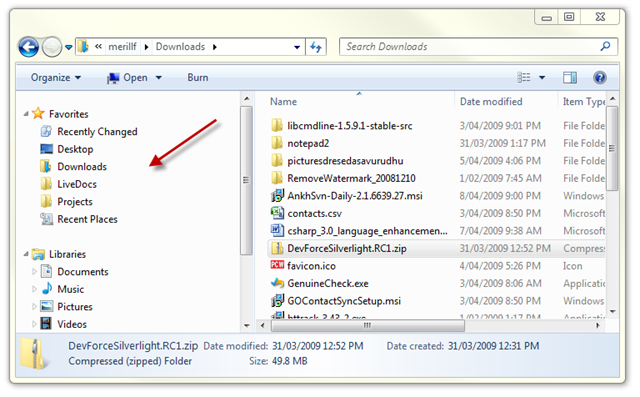
Luckily there is a new Folder Option called Navigation Pane to switch them back on again. You need to press Alt + T or Organize –> Folder Search Options in Windows Explorer to get to the dialog.
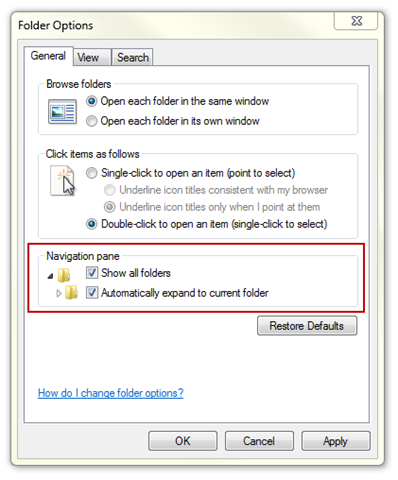
Switch both of them on and viola I get my beloved tree view back.
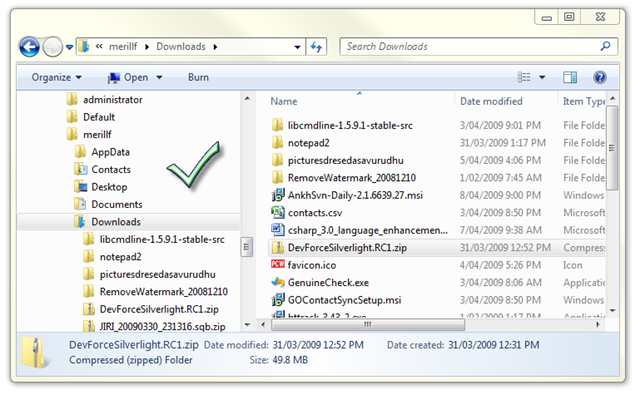
PS- Most of my UW colleagues use other explorers and didn’t have to feel this pain.
Useful tip, thanks. You also need Organize, Layout, Navigation Pane to see the tree.
I run a dual boot Windows 98 & NT m/c at home on an ancient AMD with 512Mb RAM. Amazing how fast NT starts up & how little memory it uses compared to Windows 7 at work. Being a developer I find all the “idiot friendly” stuff intensely annoying. I suspect M$ lost the plot as regards usability testing years ago. You only have to use a browser like firefox with AdBlock & FlashBlock to realise IE is seriously deficient.
MY HERO! Thank you for this!
I too thank you for resolving yet another quirk that was driving me nuts in my transition to Win7 ~ THANKS!!
Ditto… XP worked fine for me but I got talked into “upgrading” to Win7 and I hate it! Seems to me it’s just Vista re-packaged after they fixed a the worst of it’s “issues”
Likewise I’ve been defending the PC all these years but, after seeing what they’ve done Vista and Win7, I’m thinking maybe I should just buy a Mac and load it up with the MS Office suite.
But for now I’m back to google to see if anyone has figured out how to display that “up one folder” icon and pin the Explorer shortcut to the start menu…. if that’s even possible.
Yay… I got my UP button back!
If you want all those start menu and explorer features that you loved and lost when you “upgraded” to Win7 you can download the “Classic Shell” application for free at this URL >>>> http://classicshell.sourceforge.net/
OMG it’s like putting on a pair of comfy old shoes after you’ve been limping around in new ones that look nice but just don’t fit right.
Thanks… great tip. Stupid explorer!!!
nice tips!
@KS
You are my new hero. Why oh why is it necessary to alter these basic functions. I just helped a co-worker that had already spent an hour on his own trying to figure out how to get his signature turned back on in Outlook.
Oh man this post made my day. Thankyou for sharing to help all of us frustrated newbie win 7 users. God Bless You.
And relax… Thank you so much… Over 12 months I’ve lived without knowing this
It’s always nice to find the perfect solution as the first hit on a google search for what i need. Thank you, worked like a charm.
Thanks
It was an easy answer to my need.
Anyway I think Windows 7 is a top system for now and will slowly replace Win XP to be classic.
Totally awesome, thanks.
Cheers buddy, the frustration levels were getting outta control.
Thanks, was frustrated previously.
I set my machine up like this when I first got it. It didn’t change a thing. Any other ideas?
Thanks a bunch. Probably a great feature for some, really irritating for me.
Great, thanks a lot! I’m so used to the tree view… and then working with the explorer in win7 drove me absolutely crazy. This makes it again the way I’m used to… great!
Thanks for the tip! This is one of those things that make you wonder: are there really ANY people who actually prefer the default setting? So why is it default then?
Thank you for this. I try to avoid Explorer because of this and other ‘limitations’ and normally use FarManager2 when need to traverse a lot of tree structures. But this helped. At DOS prompt i also make a lot of use of “tree /F” to see what is there.
Thank you – keep up the good work.
@Howard M Thank you Howard.. Actually your comment solved my problem about the navigation pane..
Thanks so much! This was driving me nuts!
Thanks my friend. Your page was #1 on Google for “folder tree in windows 7″ search
Merill, you’re the best mate. I’ve been looking on how to fix this issue and your article is the most detailed I’ve found. Thanks again!
Perfect!!! Thanks for the tip. This has been annoying me for ages!
THANK YOU!
just upgraded to new laptop with Windows 7, did not even realize why I was frustrated in explorer 7 until used old machine to grab some files. Noticed tree was not there on left and had to do additinal clicks. Not anymore. Great!